
Kia Optima DL3: Lighting / Front fog light
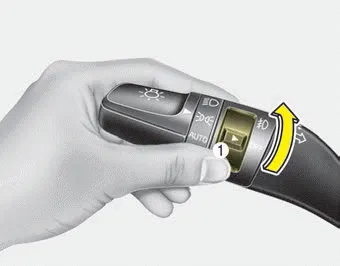
Fog lights are used to provide improved visibility when visibility is poor due to fog, rain or snow, etc. The fog lights will turn on when the fog light switch (1) is turned to the on position after the headlights are turned on.
To turn off the fog lights, turn the switch (1) to the off position.
When in operation, the fog lights consume large amounts of vehicle electrical power. Only use the fog lights when visibility is poor.
This warning message illuminates if there is a malfunction (burned-out bulb except LED lamp or circuit malfunction) with the headlamp. In this case, have your vehicle inspected by an authorized Kia dealer.
Windshield wiper/washer A : Wiper speed control (front) · MIST – Single wipe · OFF – Off · INT – Intermittent wipe AUTO* – Auto control wipe · LO – Low wiper speed · HI – High wiper speed B : Intermittent control wipe time adjustment C :Wash with brief wipes (front)*
Other information:
Kia Optima DL3 2019-2026 Service and Repair Manual: Rear Glass Defogger Printed Heater
Repair procedures Inspection • Wrap tin foil around the end of the voltmeter test lead to prevent damaging the heater line. Apply pressure on the tin foil with hand and move the tin foil along the grid line to check for open circ
Kia Optima DL3 2019-2026 Service and Repair Manual: Heating, Ventilation and Air Conditioning
Service data Service Data Air Conditioner ltem Specification Compressor Type 6SAS14 Oil type & Capacity ND-OIL 12 80 ± 10 cc (2.82 ± 0.
Categories
- Manuals Home
- Kia Optima Owners Manual
- Kia Optima Service Manual
- CVVT Oil Control Valve (OCV)
- Engine Mechanical System
- Brake System
- New on site
- Most important about car
