
Kia Optima DL3: Lighting / High beam operation
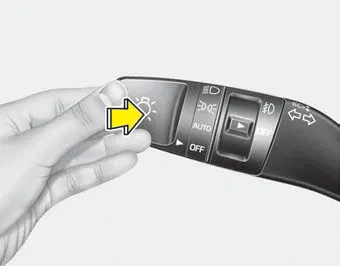
To turn on the high beam headlamp, push the lever away from you. The lever will return to its original position.
To turn off the high beam headlamps, pull the lever towards you. It will return to the normal (low beam) position when released.
The high beam indicator will light when the headlight high beams are switched on. To prevent the battery from being discharged, do not leave the lights on for a prolonged time while the engine is not running.
WARNING - High beams
Do not use high beam when there are other vehicles in front of your vehicle. Using high beam could obstruct the other driver’s vision.
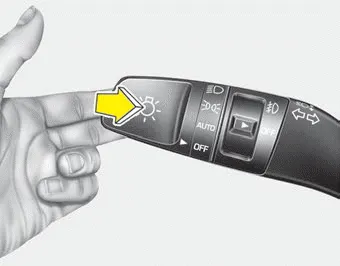
To flash the headlight high beams, pull the lever towards you. It will return to the normal (low beam) position when released. The headlight switch does not need to be on to use this flashing feature.
The light switch has a Headlight and a Parking light position. To operate the lights, turn the knob at the end of the control lever to one of the following positions: (1) OFF position (2) Auto light position (3) Parking & Tail light (4) Headlight position Parking & Tail light When the light switch is in the parking light position, the tail, license and instrument panel lights will turn ON.
The High Beam Assist is a system that automatically adjusts the headlamp range (switches between high beam and low beam) according to the brightness of other vehicles and road conditions.
Other information:
Kia Optima DL3 2019-2026 Service and Repair Manual: Wiper Motor
Schematic diagrams Connector and Terminal Function Pin Function 1 Ground (-) 2 Parking 3 Power (+) 4 Low 5 High Repair procedures Remova
Kia Optima DL3 2019-2026 Service and Repair Manual: Auto Defogging Sensor
Description and operation Description The auto defogging sensor is installed on the front window glass. The sensor judges and sends signal if moisture occurs to blow out wind for defogging. The air conditioner control module receives signal from the sensor and restrains moisture and eliminate defog by controlling the intake actu
Categories
- Manuals Home
- Kia Optima Owners Manual
- Kia Optima Service Manual
- Engine Control / Fuel System
- Floor Console Assembly
- Motor Driven Power Steering
- New on site
- Most important about car
