
Kia Optima DL3: Front View Camera System / Lane Keeping Assist (LKA) ON/OFF Switch
Schematic diagrams
| Connector and Terminal Function |
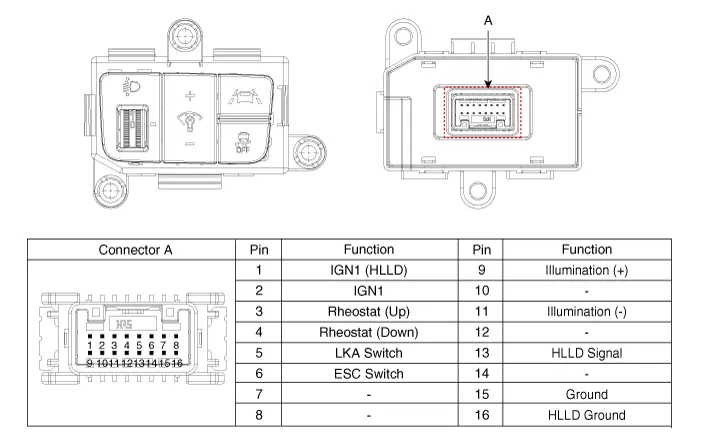
Repair procedures
| Inspection |
| 1. |
Disconnect the negative (-) battery terminal. |
| 2. |
Remove the crash pad lower panel. (Refer to Body - "Crash Pad Lower Panel") |
| 3. |
Remove the crash pad garnish [LH] (Refer to Body - "Crash Pad Garnish") |
| 4. |
Remove the crash pad lower garnish after loosening the mounting screws.
|
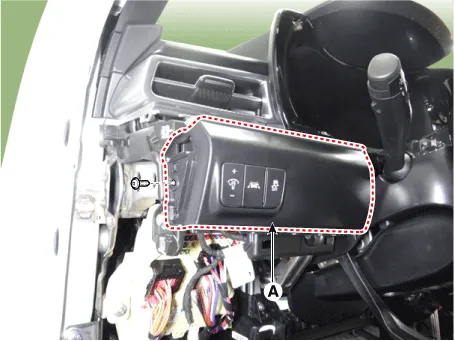
| 5. |
Disconnect the crash pad lower garnish switch connector (A).
|
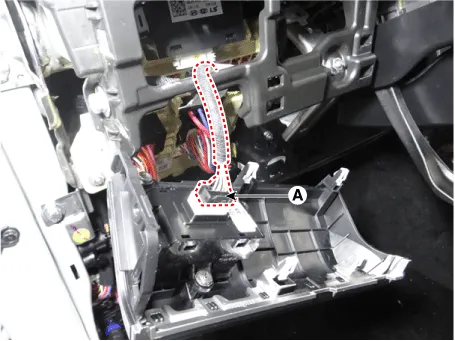
| 6. |
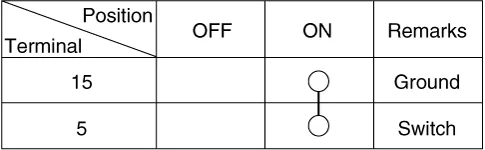
Operate the LKA on/off switch, then check for continuity between terminals.
|
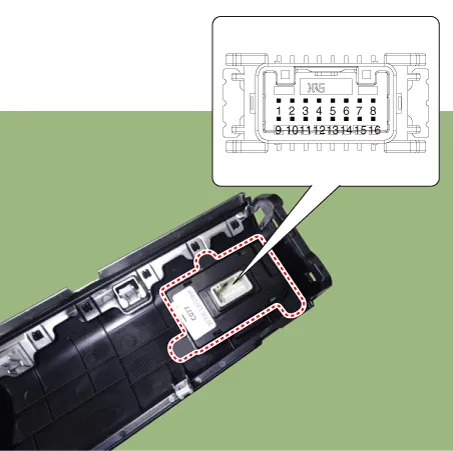
| Removal |
| 1. |
Disconnect the negative (-) battery terminal. |
| 2. |
Remove the crash pad lower panel. (Refer to Body - "Crash Pad Lower Panel") |
| 3. |
Remove the crash pad garnish [LH] (Refer to Body - "Crash Pad Garnish") |
| 4. |
Remove the crash pad lower garnish after loosening the mounting screws.
|
| 5. |
Disconnect the crash pad lower garnish switch connector (A).
|
| Installation |
| 1. |
Install in the reverse order of removal. |
Schematic diagrams Circuit Diagram Repair procedures Inspection 1. In the body electrical system, failure can be quickly diagnosed by using Kia Diagnostic System (KDS).
Components and components location Components Location 1. Smart Cruise Control (SCC) switch 2. Front radar unit Description and operation Description System Function • Forward Collision-avoidance Assist (FCA) : Detects the risk factors on the road and warn the driver and activate the emergency brake to prevent collision or reduce collision speed.
Other information:
Kia Optima DL3 2019-2026 Service and Repair Manual: Vanity Lamp
Repair procedures Removal When removing with a flat-tip screwdriver or remover, wrap protective tape around the tools to prevent damage to components. 1.
Kia Optima DL3 2019-2026 Service and Repair Manual: Personal Lamp
Repair procedures Removal When removing with a flat-tip screwdriver or remover, wrap protective tape around the tools to prevent damage to components. 1.
Categories
- Manuals Home
- Kia Optima Owners Manual
- Kia Optima Service Manual
- Timing Chain
- Emergency trunk safety release
- Lift And Support Points
- New on site
- Most important about car
