
Kia Optima DL3: Charging System / Wireless Charging Indicator
Schematic diagrams
| Connector and Terminal function |

|
Pin |
Function |
|
1 |
Ground |
|
2 |
LED charging lamp (Green) |
|
3 |
LED charging lamp (Amber) |
|
4 |
- |
|
5 |
Illumination (-) |
|
6 |
Illumination (+) |
Repair procedures
| Removal |
| 1. |
Disconnect the negative battery terminal. |
| 2. |
Remove the console upper cover. (Refer to Body - "Floor Console Assembly") |
| 3. |
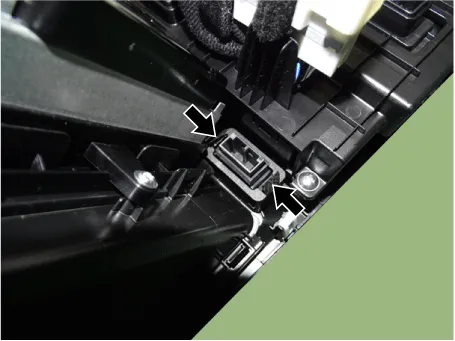
Disconnect the wireless power charger indicator connector (A).
|

| 4. |
Remove the wireless power charger indicator (A) by pressing the fixing hooks.
|

| Installation |
| 1. |
Install in the reverse order of removal. |
Specifications Specifications Items Specification Operating voltage DC 9 - 16 V Operating temperature -22 to 167 °F (-30 to +75 °C) Dark current MAX.
Description and operation Description The ECM (Electro Chromatic inside rear view Mirror) is one that automatically dims to protect the driver’s eyes when it senses light reflecting from the car behind.
Other information:
Kia Optima DL3 2019-2026 Service and Repair Manual: Power Window Motor
Schematic diagrams Circuit Diagram [Safety Window Motor] [Standard Window Motor] Repair procedures Inspection Front Power Window Motor 1. Disconnect the negative battery terminal. 2.
Kia Optima DL3 2019-2026 Service and Repair Manual: Heater & A/C Control Unit (DATC)
Components and components location Components Connector Pin NO Funtion Pin NO Funtion 1 Ground 9 Ground 2 ILL- 10 - 3 - 11
Categories
- Manuals Home
- Kia Optima Owners Manual
- Kia Optima Service Manual
- Restraint
- Heating, Ventilation and Air Conditioning
- Engine Mechanical System
- New on site
- Most important about car
