
Kia Optima DL3: Heating and air conditioning / Fan speed control, Air conditioning
Fan speed control
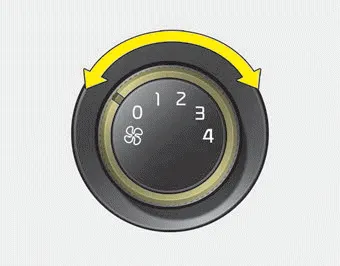
The ignition switch must be in the ON position for fan operation.
The fan speed control knob allows you to control the fan speed of the air flowing from the ventilation system. To change the fan speed, turn the knob to the right for higher speed or left for lower speed.
Setting the fan speed control knob to the “0” position turns off the fan.
Air conditioning

Press the A/C button to turn the air conditioning system on (indicator light will illuminate). Press the button again to turn the air conditioning system off.
The outside (fresh) air position is automatically selected, when the sunroof is opened. When you select the recirculated air position, the system maintains the recirculated air position for 3 minutes and then automatically converts to the outside (fresh) air position.
Ventilation 1.Set the mode to the position. 2.Set the air intake control to the outside (fresh) air position. 3.Set the temperature control to the desired position.
Other information:
Kia Optima DL3 2019-2026 Service and Repair Manual: Mood Lamp Unit
Schematic diagrams Connector and Terminal function Repair procedures Removal When removing with a flat-tip screwdriver or remover, wrap protective tape around the tools to prevent damage to components.
Kia Optima DL3 2019-2026 Service and Repair Manual: Heater Core
Repair procedures Replacement 1. Disconnect the negative (-) battery terminal. 2. Remove the heater and blower assembly. (Refer to Heater - "Heater Unit") 3. Loosen the mounting screws and remove the heater core cover (A).
Categories
- Manuals Home
- Kia Optima Owners Manual
- Kia Optima Service Manual
- Heating, Ventilation and Air Conditioning
- Restraint
- CVVT Oil Control Valve (OCV)
- New on site
- Most important about car
