
Kia Optima DL3: Interior lights / Map lamp
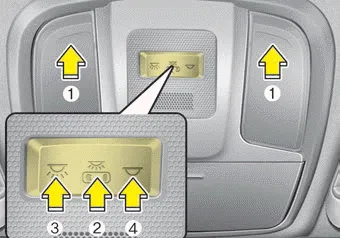
■ Type A
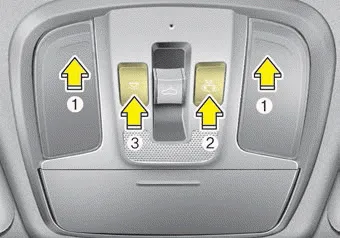
■ Type B
• Press the lens (1) to turn ON the map lamp.
To turn the map lamp OFF press the lens (1) again.
•
 (2) : DOOR mode
- The map lamp and room lamp come on when a door is opened. The lamps go out
after approximately 30 seconds.
- The map lamp and room lamp come on for approximately 30 seconds when doors are
unlocked with a transmitter or smart key as long as the doors are not opened.
- The map lamp and room lamp will stay on for approximately 20 minutes if a door
is opened with the ignition switch in the ACC or LOCK/OFF position.
- The map lamp and room lamp will stay on continuously if the door is opened with
the ignition switch in the ON position.
- The map lamp and room lamp will go out immediately if the ignition switch is changed
to the ON position or all doors are locked.
- To turn off the DOOR mode, press the DOOR button (2) once again (not pressed).
✽ NOTICE
The DOOR mode and ROOM mode can not be selected at the same time.
Front Room Lamp:
• Type A
 (3): Press this switch to turn the
front and rear room lamps on.
(3): Press this switch to turn the
front and rear room lamps on.
 (4): Press this switch to turn the
front and rear room lamps off.
(4): Press this switch to turn the
front and rear room lamps off.
• Type B
 (3): Press this switch to turn the
front and rear room lamps on and off.
(3): Press this switch to turn the
front and rear room lamps on and off.
■ Type A ■ Type B ■ Type C • : The light stays on at all times.
The trunk room lamp comes on when the trunk is opened. ✽ NOTICE The trunk room lamp comes on as long as the trunk lid opens. To prevent unnecessary battery drain, close the trunk lid securely after using the trunk.
Other information:
Kia Optima DL3 2019-2026 Service and Repair Manual: License Lamps
Repair procedures Removal 1. Disconnect the negative battery terminal. 2. Remove the lcense lamp (A) by pressing the hook. 3. Disconnect the lcense lamp connector (A).
Kia Optima DL3 2019-2026 Service and Repair Manual: Evaporator Core
Repair procedures Replacement 1. Disconnect the negative (-) battery terminal. 2. Remove the heater and blower assembly. (Refer to Heater - "Heater Unit") 3. Loosen the mounting screws, lock pin and remove the evaporator core cover (A).
Categories
- Manuals Home
- Kia Optima Owners Manual
- Kia Optima Service Manual
- Motor Driven Power Steering
- Timing Chain
- Emergency trunk safety release
- New on site
- Most important about car
