
Kia Optima DL3: Body Electrical System / Ignition Switch Assembly
Repair procedures
| Removal |
| 1. |
Disconnect the negative battery terminal. |
| 2. |
Remove the steering column upper & lower shroud panel. (Refer to Body - "Steering Column Shroud Panel") |
| 3. |
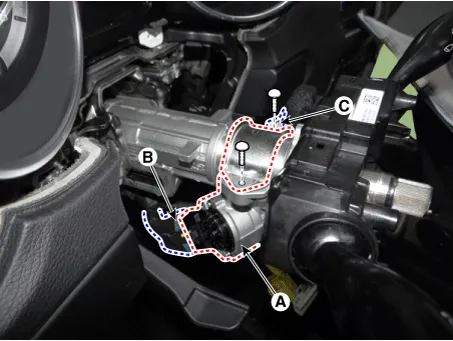
Remove the ignition lock switch assembly (A) by loosening the bolts after disconnecting the connectors (B, C).
|
| Installation |
| 1. |
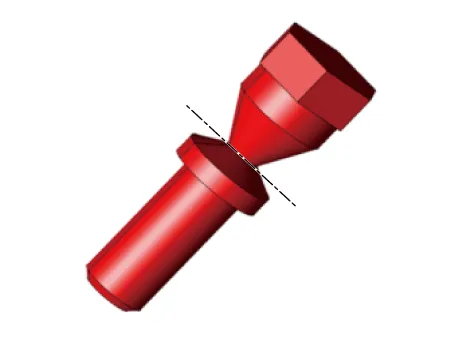
Install in the reverse order of removal.
|

| Inspection |
| 1. |
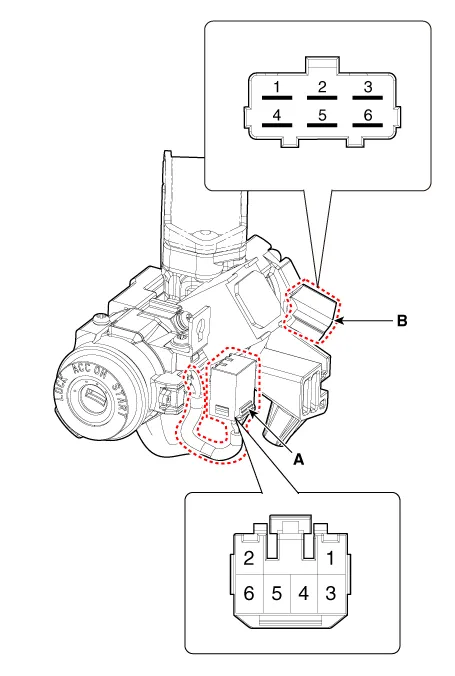
Disconnect the ignition switch connector (B) and key warning switch connector (A) from under the steering column.
|
| 2. |
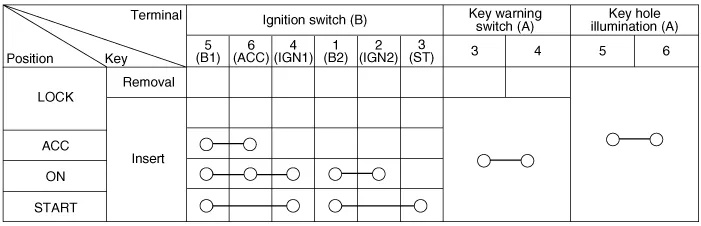
Check for continuity between the terminals.
|
Specifications Specifications Item Specification Remark Operating voltage 9 - 16 V - Current consumption MAX 5.
Other information:
Kia Optima DL3 2019-2026 Service and Repair Manual: Power Door Mirrors
C
Kia Optima DL3 2019-2026 Service and Repair Manual: Smart Key
Repair procedures Adjustment Smart Key Code Saving 1. Connect the VCI II in driver side crash pad lower panel, turn the power on KDS. 2. Select the vehicle model and then do "Smart key code saving".
Categories
- Manuals Home
- Kia Optima Owners Manual
- Kia Optima Service Manual
- Floor Console Assembly
- Battery
- Engine Control / Fuel System
- New on site
- Most important about car
