
Kia Optima DL3: Auto Lighting Control System / Auto Light Sensor
Schematic diagrams
| Circuit Diagram |
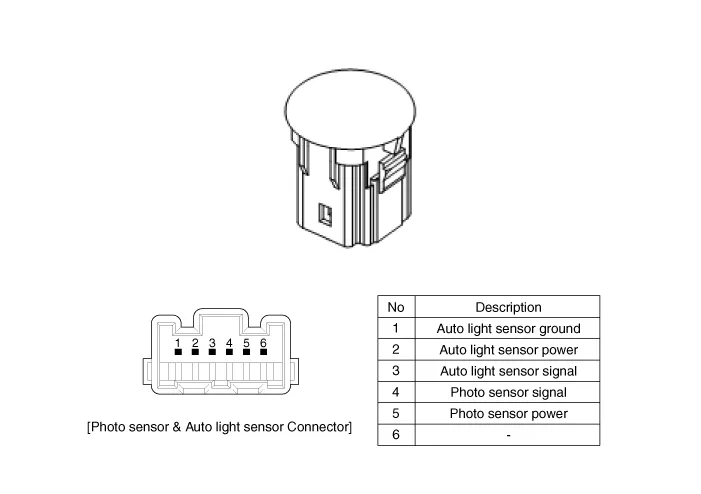
Repair procedures
| Removal |
| 1. |
Disconnect the negative battery terminal. |
| 2. |
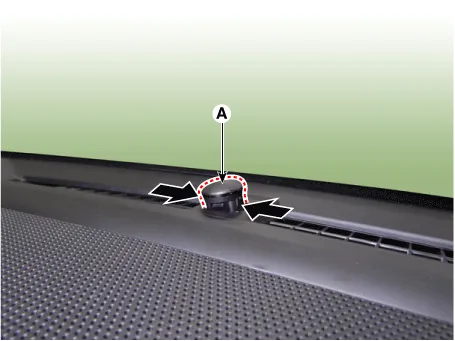
Remove the photo sensor & auto light sensor (A) by pressing the locking pins.
|
| 3. |
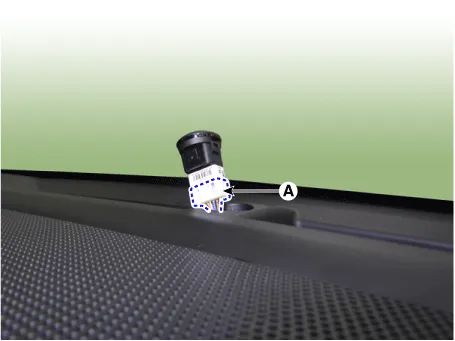
Disconnect the photo sensor & auto light sensor connector (A).
|
| Installation |
| 1. |
Install in the reverse order of removal. |
Specifications Specifications Items Specifications Rated voltage DC +5 V Load Max.
Components and components location Component Location 1. Audio head unit/AVN head unit 2. Tweeter speaker 3. Center speaker 4.
Other information:
Kia Optima DL3 2019-2026 Service and Repair Manual: Fog Lamp
Repair procedures Removal Front Fog Lamp 1. Disconnect the negative battery terminal. 2. Remove the front bumper assembly. (Refer to Body - "Front Bumper Assembly") 3.
Kia Optima DL3 2019-2026 Service and Repair Manual: Auto Defoging Actuator
Components and components location Components Location 1. Auto logging actuator Description and operation Description The auto defogging sensor is installed on front window glass. The sensor judges and sends signal if moisture occurs to blow out wind for defogging.
Categories
- Manuals Home
- Kia Optima Owners Manual
- Kia Optima Service Manual
- Battery
- Floor Console Assembly
- Body Electrical System
- New on site
- Most important about car
