
Kia Optima DL3: Lighting System / Hazard Lamp Switch
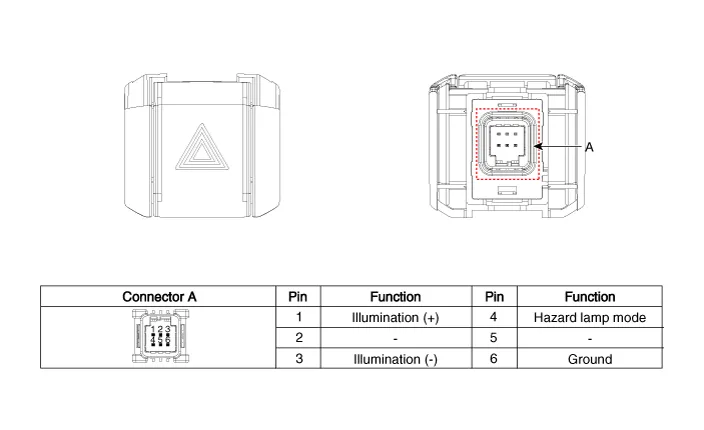
Schematic diagrams
| Connector and Terminal Function |
Repair procedures
| Removal |
| 1. |
Disconnect the negative battery terminal. |
| 2. |
Remove the crash pad garnish [RH]. (Refer to Body - "Crash Pad Garnish") |
| 3. |
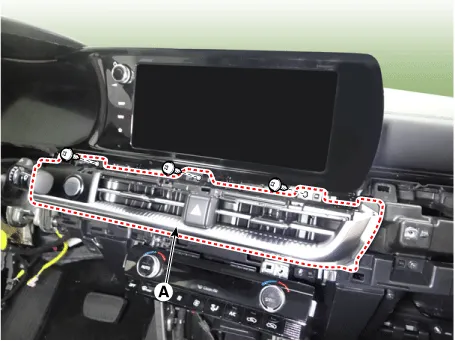
Remove the center air vent garnish (A) by loosening the mounting screws.
|
| 4. |
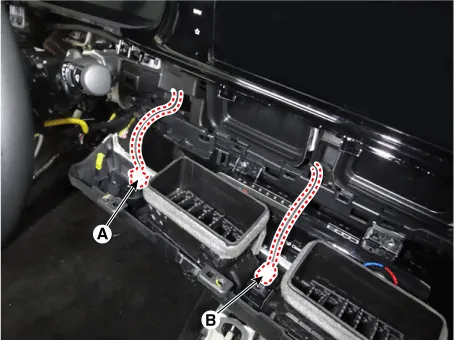
Disconnect the start/stop button connector (A) and hazard lamp switch connector (B).
|
| 5. |
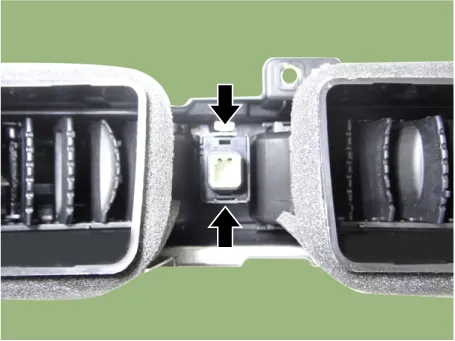
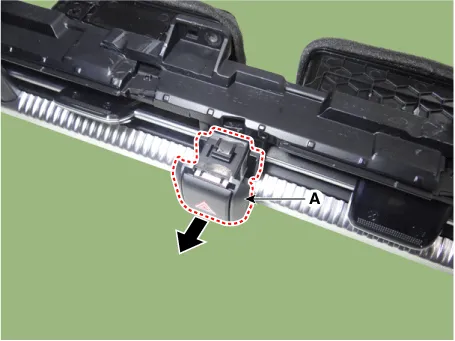
Remove the hazard lamp switch (A) by pressing the hooks.
|
| Installation |
| 1. |
Install in the reverse order of removal. |
| Inspection |
| 1. |
Disconnect the negative battery terminal. |
| 2. |
Remove the crash pad garnish [RH]. (Refer to Body - "Crash Pad Garnish") |
| 3. |
Remove the center air vent garnish (A) by loosening the mounting screws.
|
| 4. |
Disconnect the start/stop button connector (A) and hazard lamp switch connector (B).
|
| 5. |
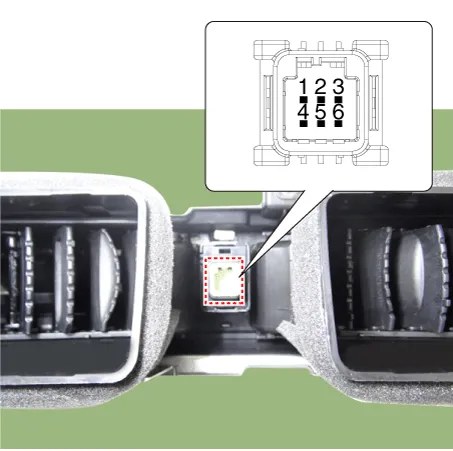
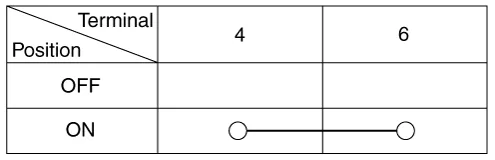
Check for continuity between the terminals.
|
Repair procedures Removal Front Fog Lamp 1. Disconnect the negative battery terminal. 2. Remove the front bumper assembly.
Components and components location Component Location 1. Low beam 2. High beam 3. Daytime Running Light / Position lamp 4.
Other information:
Kia Optima DL3 2019-2026 Service and Repair Manual: Power Door Lock Switch
Repair procedures Inspection Power Window Main Switch Diagnosis With KDS 1. In the body electrical system, failure can be quickly diagnosed by using the vehicle diagnostic system (KDS). The diagnostic system (KDS) provides the following information.
Kia Optima DL3 2019-2026 Service and Repair Manual: Evaporator Temperature Sensor
Description and operation Description The evaporator temperature sensor will detect the evaporator core temperature and interrupt compressor relay power in order to prevent evaporator from freezing by excessive cooling. The evaporator temperature sensor has the Negative Temperature Coefficient (NTC).
Categories
- Manuals Home
- Kia Optima Owners Manual
- Kia Optima Service Manual
- Engine Control / Fuel System
- Timing Chain
- Suspension System
- New on site
- Most important about car
