
Kia Optima DL3: Roof Trim / Sunvisor
Components and components location
| Component Location |
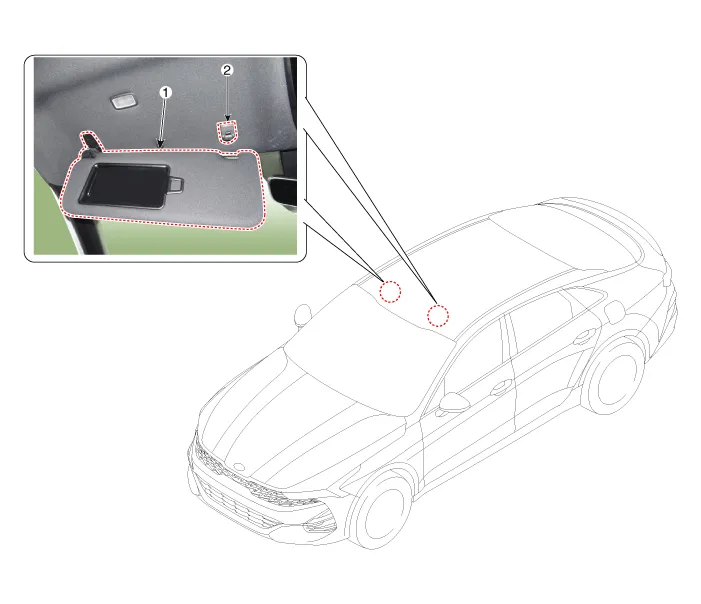
| 1. Sunvisor |
2. Retainer |
Repair procedures
| Replacement |
|

| 1. |
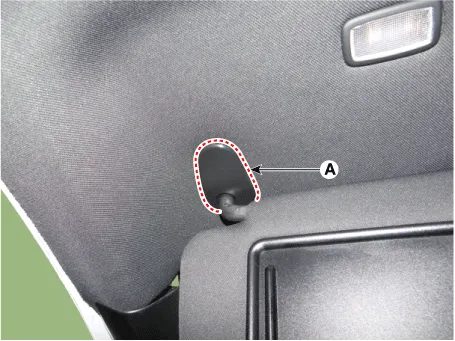
Remove the sunvisor mounting cover (A).
|
| 2. |
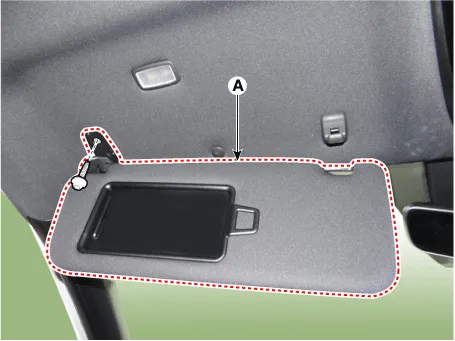
Loosen the mounting screw, and then remove the sunvisor (A).
|
| 3. |
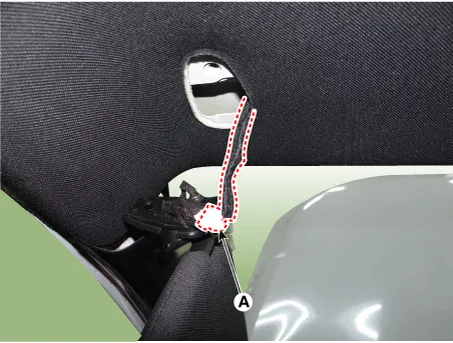
Disconnect the connector (A).
|
| 4. |
Loosen the mounting screw, and then remove the retainer (A).
|

| 5. |
To install, reverse the removal procedure. |
Components and components location Components [General Type] 1. Sunvisor [LH] 2. Sunvisor [RH] 3. Roof trim [Panorama Sunroof Type] 1.
Components and components location Component Location 1. Assist handle Repair procedures Replacement • When removing with a flat-tip screwdriver or remover, wrap protective tape around the tools to prevent damage to components.
Other information:
Kia Optima DL3 2019-2026 Service and Repair Manual: Trunk Room Lamp
Repair procedures Removal 1. Disconnect the negative battery terminal. 2. Remove the trunk room lamp (A) by pressing the hook. 3. Disconnect the trunk room lamp connector (A).
Kia Optima DL3 2019-2026 Service and Repair Manual: Photo Sensor
Description and operation Description The photo sensor is located at the center of the defrost nozzles. The photo sensor contains a photovoltaic (sensitive to sunlight) diode. The solar radiation received by its light receiving portion, generates an electromotive force in proportion to the amount of radiation received which is
Categories
- Manuals Home
- Kia Optima Owners Manual
- Kia Optima Service Manual
- Cooling System
- Air bag collision sensors
- Emergency trunk safety release
- New on site
- Most important about car
