
Kia Optima DL3: Body (Interior and Exterior) / Trunk Trim
Components and components location
| Component Location |
[General type]

| 1. Luggage partition center trim
2. Rear package tray trim 3. Luggage side trim [LH] 4. Luggage side trim [RH] |
5. Luggage covering mat 6. Luggage floor mat 7. Rear transverse trim |
[Option type]
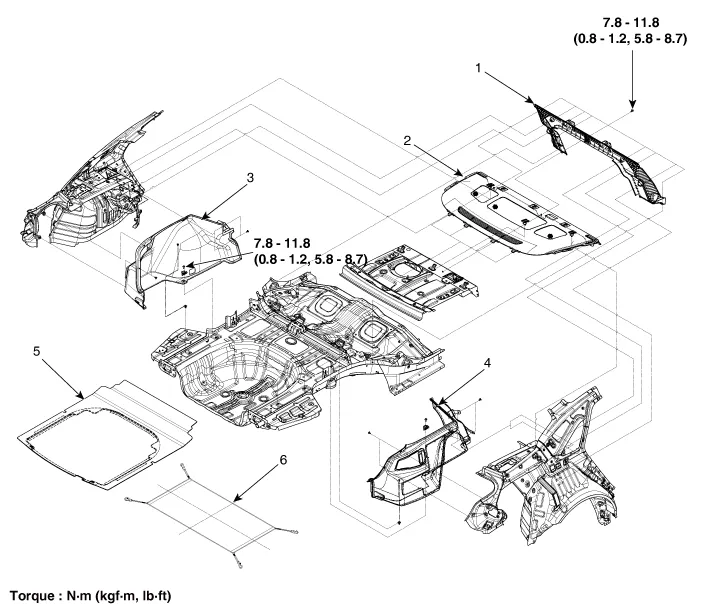
| 1. Luggage partition center trim
2. Rear package tray trim 3. Luggage side trim [LH] |
4. Luggage side trim [RH] 5. Luggage covering mat 6. Luggage net |
Components and components location Component Location 1. Rear pillar trim Repair procedures Replacement • When removing with a flat-tip screwdriver or remover, wrap protective tape around the tools to prevent damage to components.
Components and components location Component Location 1. Rear package tray trim Repair procedures Replacement Rear package tray trim • When removing with a flat-tip screwdriver or remover, wrap protective tape around the tools to prevent damage to components.
Other information:
Kia Optima DL3 2019-2026 Service and Repair Manual: Rear Combination Lamp
Components and components location Component Location 1. Tail lamp 2. Stop lamp 3. Tail/Stop lamp 4. Back up lamp 5. Turn signal lamp Schematic diagrams Connector and Terminal Function [A Type] Pin Function Center Ou
Kia Optima DL3 2019-2026 Service and Repair Manual: Smart Key Unit
Schematic diagrams Connector and Terminal Function Pin Function Connector A Connector B Connector C Connector D 1 - Front washer switch (Output) - Driver outside handle switch (Input)
Categories
- Manuals Home
- Kia Optima Owners Manual
- Kia Optima Service Manual
- Floor Console Assembly
- Timing Chain
- Emergency trunk safety release
- New on site
- Most important about car
