
Kia Optima DL3: Interior Trim / Rear Pillar Trim
Components and components location
| Component Location |
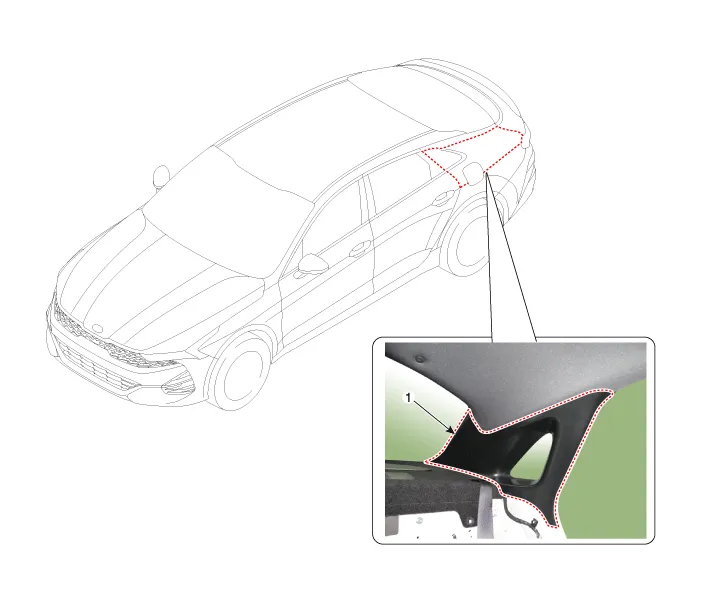
| 1. Rear pillar trim |
Repair procedures
| Replacement |
|

| 1. |
Remove the rear door body side weatherstrip. (Refer to Rear Door - "Rear Door Side Weatherstrip") |
| 2. |
Remove the rear seat back assembly. (Refer to Rear Seat - "Rear Seat Assembly") |
| 3. |
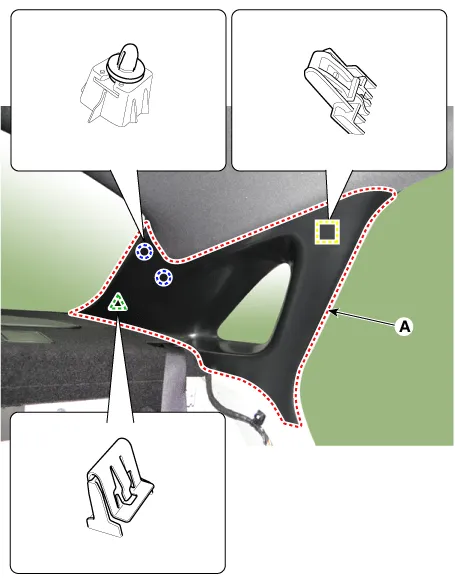
Using a flat-tip screwdriver and remove the rear pillar trim (A).
|
| 4. |
To install, reverse the removal procedure.
|

Components and components location Component Location 1. Center pillar lower trim 2. Center pillar upper trim Repair procedures Replacement [Center pillar lower trim] Put on gloves to prevent hand injuries.
Components and components location Component Location [General type] 1. Luggage partition center trim 2. Rear package tray trim 3.
Other information:
Kia Optima DL3 2019-2026 Service and Repair Manual: Personal Lamp
Repair procedures Removal When removing with a flat-tip screwdriver or remover, wrap protective tape around the tools to prevent damage to components. 1.
Kia Optima DL3 2019-2026 Service and Repair Manual: Evaporator Temperature Sensor
Description and operation Description The evaporator temperature sensor will detect the evaporator core temperature and interrupt compressor relay power in order to prevent evaporator from freezing by excessive cooling. The evaporator temperature sensor has the Negative Temperature Coefficient (NTC).
Categories
- Manuals Home
- Kia Optima Owners Manual
- Kia Optima Service Manual
- CVVT Oil Control Valve (OCV)
- Emergency trunk safety release
- Body Electrical System
- New on site
- Most important about car
