Kia Optima DL3: Floor Console / Rear Console Cover
Repair procedures
| Replacement |
|

| 1. |
Remove the floor console assembly. (Refer to Floor Console - "Floor Console Assembly") |
| 2. |
Disconnect the connectors (A).
|
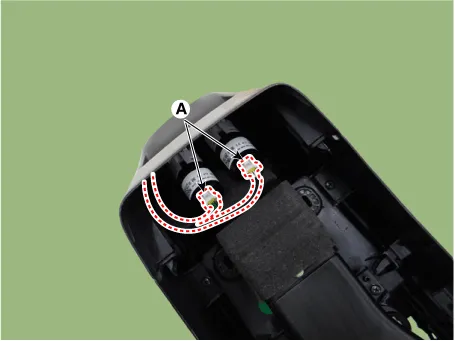
| 3. |
Using a remover and remove the rear console cover (A).
|

| 4. |
To install, reverse the removal procedure.
|

Components and components location Component Location 1. Front console assembly Repair procedures Replacement [SBC Console] • When removing with a flat-tip screwdriver or remover, wrap protective tape around the tools to prevent damage to components.
Repair procedures Replacement • When removing with a flat-tip screwdriver or remover, wrap protective tape around the tools to prevent damage to components.
Other information:
Kia Optima DL3 2019-2026 Service and Repair Manual: Smart Key Unit
Schematic diagrams Connector and Terminal Function Pin Function Connector A Connector B Connector C Connector D 1 - Front washer switch (Output) - Driver outside handle switch (Input)
Kia Optima DL3 2019-2026 Service and Repair Manual: Cluster Ionizer
Components and components location Components Location 1. Condenser Description and operation Description The cluster ionizer makes disinfection and decomposition of bad smell from the air-conditioner or inflow air.
Categories
- Manuals Home
- Kia Optima Owners Manual
- Kia Optima Service Manual
- Cooling System
- Battery
- Body Electrical System
- New on site
- Most important about car
